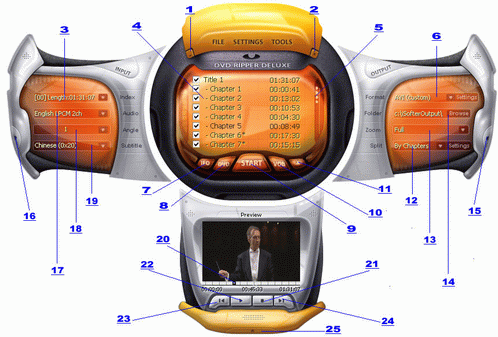
| Basic Function |
| 1.-- |
Minimize the Window |
| 2.X |
Exit the program |
| 3.Index |
Select specified program chain.
Most of movies are stored in pgc 0.
Default is : first one |
| 4.Chapter list |
List the chapter from opened dvd or file,
Tips: after open the file,you can move to the name column,click mouse right button to chage output filename |
| 5.scroll bar |
scroll bar for chapter |
| 6.Output Format |
Output video format.
Video CD is MPEG I. Super Video CD is MPEG II. AVI depends on what codec you installed.
If you choose AVI, you must select a codec in "Settings->Divx" if you want to make a DivX video.
Default is : Video CD |
| 7.IFO |
Load ifo file to rip |
| 8.DVD |
Select DVD Rom to convert full dvd |
| 9.START |
Click to convert choosed chapter or choosed segment / when you rip the dvd audio,the button will be a stop button |
| 10.VOB |
Load vob file to rip |
| 11.Refresh |
refresh the content |
| 12.Split Mode |
iSofter DVD Ripper split mode,you can custom ripping file size / custom ripping file time |
| 13.Zoom |
Letterbox , medium and pan scan convert 16:9 to 4:3
Full doesn't correct the aspect ratio.
If you have a 4:3 DVD Use Full.
Default is : Letter Box (4/3)
Custom: Allow free crop and resize
Default is : Custom |
| 14.Folder |
click the output label to goto output folder |
| 15.Ouput frame |
click to show or hide output frame |
| 16.Input frame |
click to show or hide input frame |
| 17.Audio |
Audio track to extract.
Note: Only LPCM, MPEG Audio Layer 1/2 and AC3 are supported.
Default is : first one |
| 18.Angle |
Select specified angle.
Most of movies are stored in angle 1.
Default is : 1 |
| 19.Subtitle |
Subtitle Offset:
Vertical offset in pixel of the subtitle.
This values is automatically adjusted if the subtitle goes out of the screen
Default is : first one |
| 20.PreviewScreen |
Show the dvd's preview screen |
| 21.Stop |
Click to play the movie |
| 22.Play |
Click to pause the movie |
| 23.Pre |
got pre charpter |
| 24.Next |
got to next charpter |
| 25.Preview frame |
click to show or hide preview frame |


 Screen Shot